Switch between °F and °C
Weather can show every number in U.S. units (°F, miles per hour, inches) or in metric units (°C, kilometers per hour, millimeters). The °F and °C buttons at the top of a place's page switch them all at once.
#Switch units
-
Open a place's page.
-
Select °F or °C at the top right, beside Follow and Set as home. The selected one is dark.
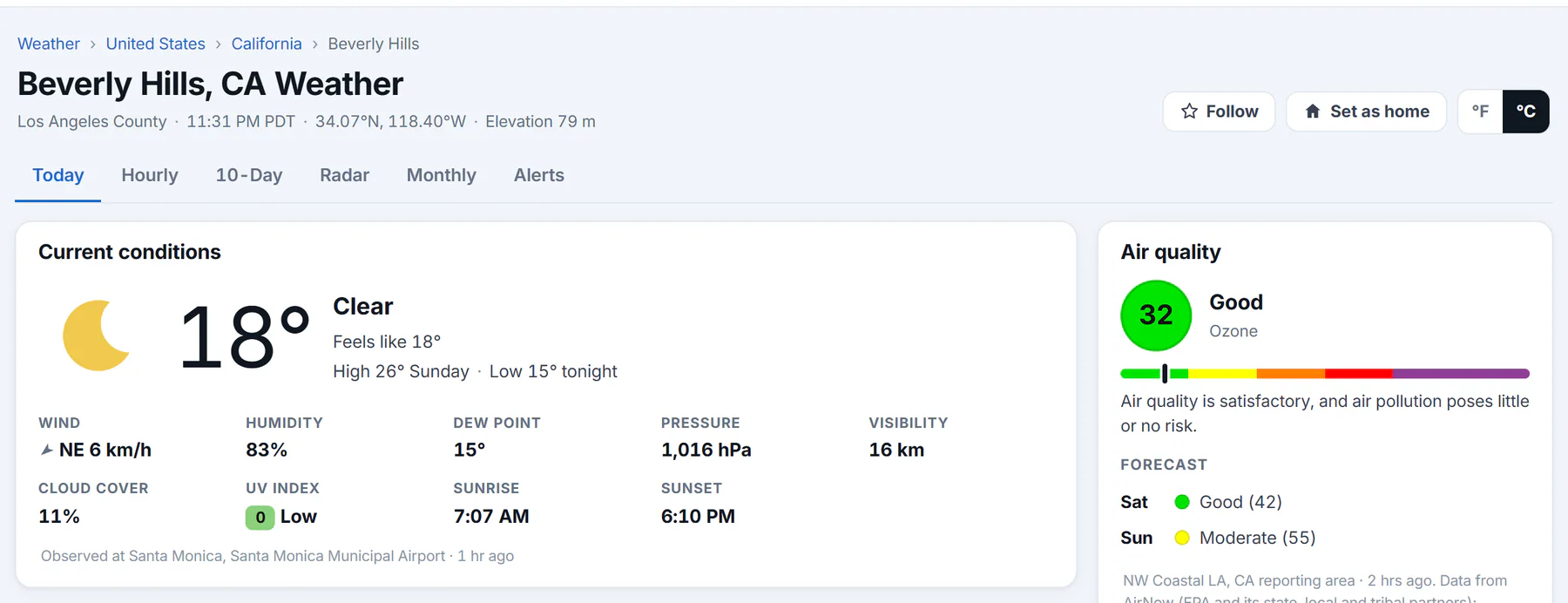
After selecting °C, the temperature, wind, pressure and visibility are in metric units.
- 1The choice you made
- 2Temperature in °C
- 3Wind, pressure and distance in metric units
-
Every number on the page changes without reloading it.
| Measure | U.S. units | Metric units |
|---|---|---|
| Temperature | °F | °C |
| Wind | mph | km/h |
| Rain and other precipitation | inches | millimeters |
| Snow | inches | centimeters |
| Pressure | inches of mercury (inHg) | hectopascals (hPa) |
| Visibility and distance | miles | kilometers |
| Elevation | feet | meters |
#Which units you see first
Until you choose, Weather uses your browser's region: U.S. units if your browser is set to the United States (and a few other places that use them), metric units for most other regions. If your browser does not say, a place shows its own country's usual units.
A state's or country's page has no switch. Its table uses the units of that country.
#How long your choice lasts
#Common questions
Does the choice change Maps or Predictions?
No. It applies to Weather pages and the weather box above search results.
Why did my units change back?
If Saved preferences is off, the choice lasts only until you close the browser. Clearing this site's cookies also resets it.
Why does a page show °F for a place in Europe?
Your browser's region is the United States, so Weather starts in U.S. units. Select °C to switch.